
 Written by
 Environment Details
OS: Azure Stack HCI (22H2)
Network Configuration: NetworkATC
Network Topology: Non-Converged
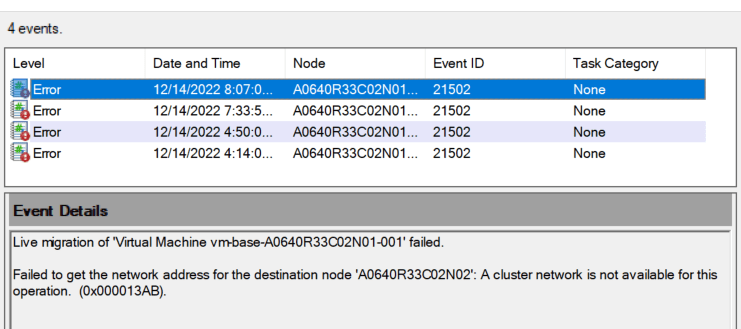
Recently encountered the following error while attempting to perform live migration of VMs in my cluster:
Live migration of 'Virtual Machine vm-base-A0640R33C02N01-001' failed.

Failed to get the network address for the destination node 'A0640R33C02N02': A cluster network is not available for this operation. (0x000013AB).
For some reason, valid cluster networks were excluded for migration. I was able to validate this running the following command:
$clusterResourceType = Get-ClusterResourceType -Name 'Virtual Machine'
Get-ClusterParameter -InputObject $clusterResourceType
This returned the following which explained why the VMs were unable to live migrate:
Object          Name                          Value
------          ----                          -----
Virtual Machine MigrationExcludeNetworks      b7afa7a2-ff32-4f8c-9a33-a5660c632e2b;00C578DA-B7C3-422F-9C58-CDE3757DE984;CBD466D2-3E53-4793-B3F0-460964E7B56A
Virtual Machine MigrationNetworkOrder
Virtual Machine MoveTypeThreshold             1000
Virtual Machine ReportNetworkFailure          1
Virtual Machine MaxClusterShutdownTimeout     4294967295
Virtual Machine SkipMigrationDestinationCheck 0
To modify the virtual machine live migration exclude networks or migration network order list, you can use either Set-VMMigrationNetwork cmdlet or the Failover Cluster Manager MMC snap-in. As a best practice, the networks that should be enabled for live migration are typically the non-routable private SMB networks:
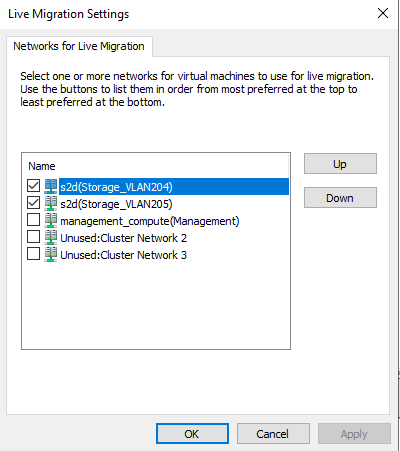
Once the live migration networks have been set according, you can re-validate this on the host by running the earlier code block:
Object          Name                          Value
------          ----                          -----
Virtual Machine MigrationExcludeNetworks      b7afa7a2-ff32-4f8c-9a33-a5660c632e2b
Virtual Machine MigrationNetworkOrder         00C578DA-B7C3-422F-9C58-CDE3757DE984;CBD466D2-3E53-4793-B3F0-460964E7B56A
Virtual Machine MoveTypeThreshold             1000
Virtual Machine ReportNetworkFailure          1
Virtual Machine MaxClusterShutdownTimeout     4294967295
Virtual Machine SkipMigrationDestinationCheck 0
 blueflashylights.com
Thanks very much Chris – solved the problem for me.
Magically my HCI cluster couldn’t migrate all of a sudden and this was the problem. I had to go in and reset the live migration networks….I have zero idea why it would have just magically lost all its live migration settings though….but this article solved it for me.